
Screenshots
App details
- Updated
- Jul 28, 2025
- Language
- English,French,Portuguese,Spanish
- Developer
- Argente Software
- Category
- Mobile
SoftPas in:
This product is also available in the following languages:
About Argente Disk Cleaner
Download Argente Disk Cleaner – PC Cleanup, Secure Deletion, File Management
Overview
Argente Disk Cleaner is a dedicated utility designed to help users manage and optimize their computer storage by removing unnecessary files that accumulate over time. The application targets temporary files, residual data from uninstalled programs, and browser-related clutter such as cookies and cache. By addressing these digital remnants, Argente Disk Cleaner aims to free up disk space, improve system responsiveness, and enhance overall performance. Its core purpose lies in simplifying routine maintenance tasks that are often overlooked by average users, making it a valuable tool for individuals seeking to keep their PCs running efficiently.
Target users include both casual computer users and those with moderate technical awareness who want a streamlined way to manage their system’s cleanliness without deep technical knowledge. The app is particularly useful for users experiencing slow performance due to disk congestion or those concerned about privacy, especially when disposing of sensitive data. While the developer did not provide additional background on their company or prior products, the app’s functionality suggests a focus on system optimization and data security.
Real-world use cases include preparing a computer for resale, freeing up space before installing large software, or maintaining consistent performance over time. In the broader app ecosystem, Argente Disk Cleaner fills a niche as a specialized tool that complements general-purpose operating systems by offering automated cleanup capabilities. Its ability to perform secure deletion adds a layer of protection against data recovery, which is increasingly important in today’s privacy-conscious environment.
Key Features & Functionality
- Comprehensive File Cleanup: The app scans for and removes temporary files, system logs, and remnants from uninstalled applications. This helps reclaim valuable disk space and reduces clutter that can slow down system operations.
- Secure Deletion Options: Argente Disk Cleaner supports seven different secure deletion methods, ensuring that removed files cannot be recovered through standard data recovery tools. This feature is ideal for users handling sensitive personal or professional information.
- Customizable Exclusions: Users can define specific file types, folders, or programs to exclude from the cleaning process. This prevents accidental deletion of important data while still allowing for a thorough system sweep.
- Automatic Program Updates: The application checks online for new programs and their associated data, automatically updating its cleaning database. This ensures the tool remains effective against emerging software footprints without requiring manual intervention.
For example, a user preparing to sell their old laptop can use the secure deletion feature to erase all traces of personal files. A student managing a limited SSD might run regular cleanups to maintain available space for new projects. The customizable exclusions help users preserve important documents or project files while removing only what’s unnecessary. These features collectively contribute to a safer, more efficient computing experience.
Interface, UX & Performance
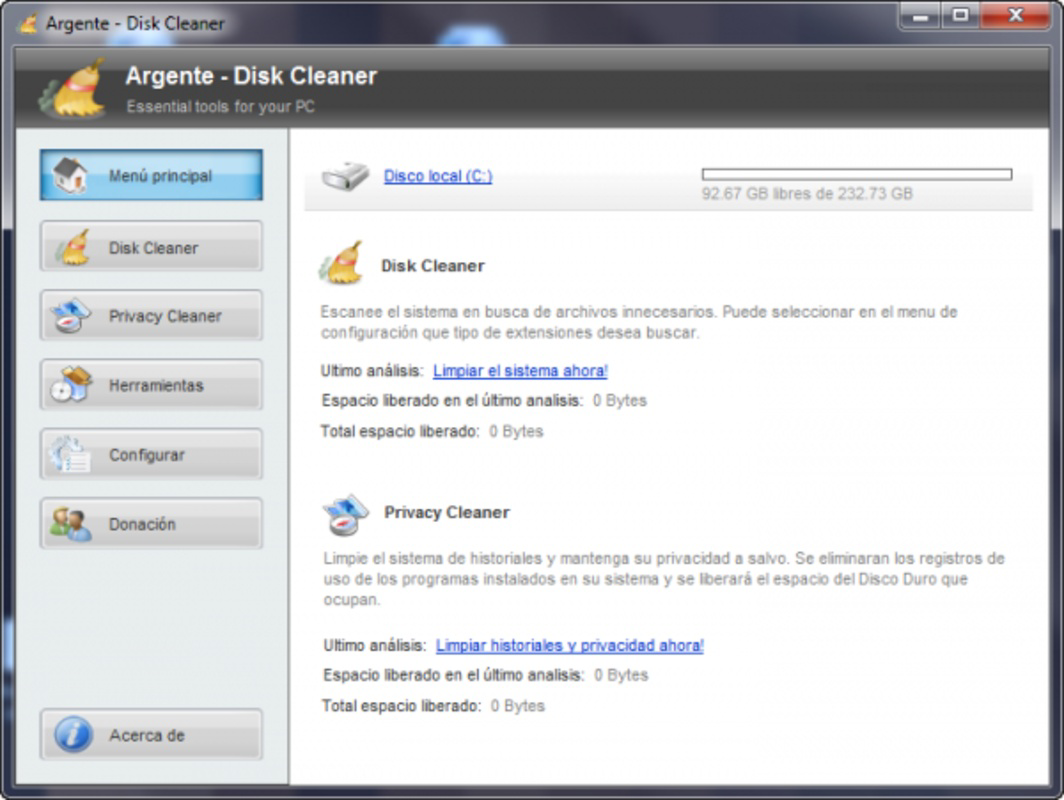
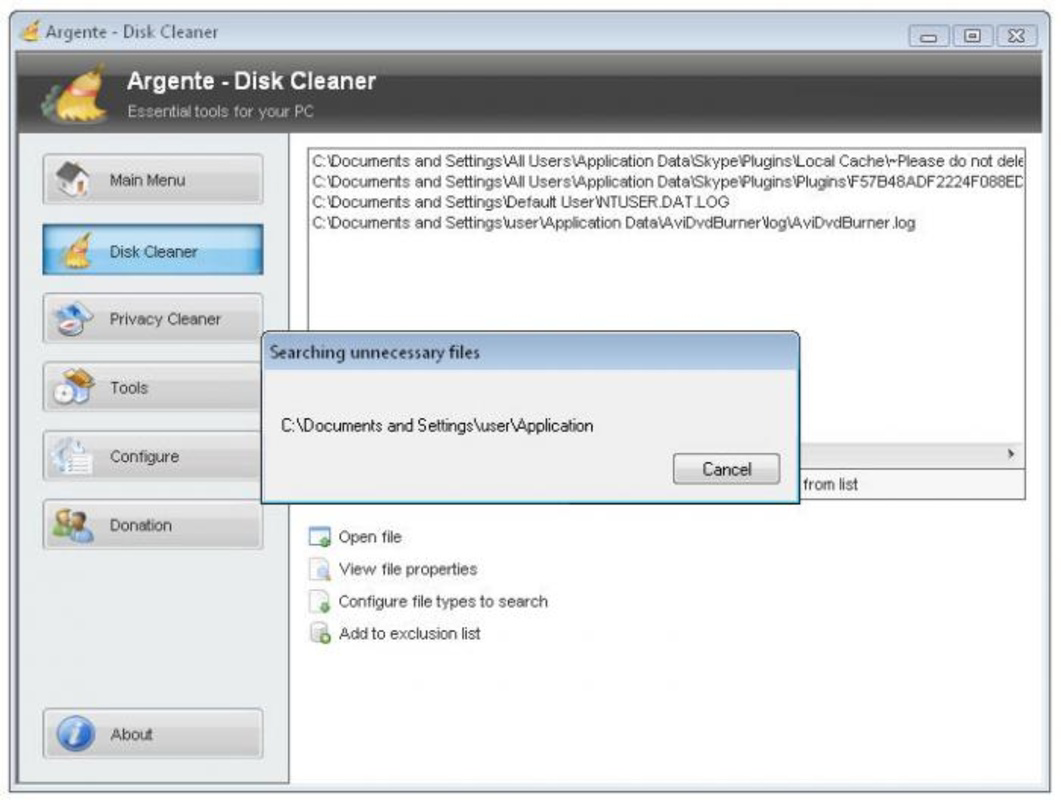
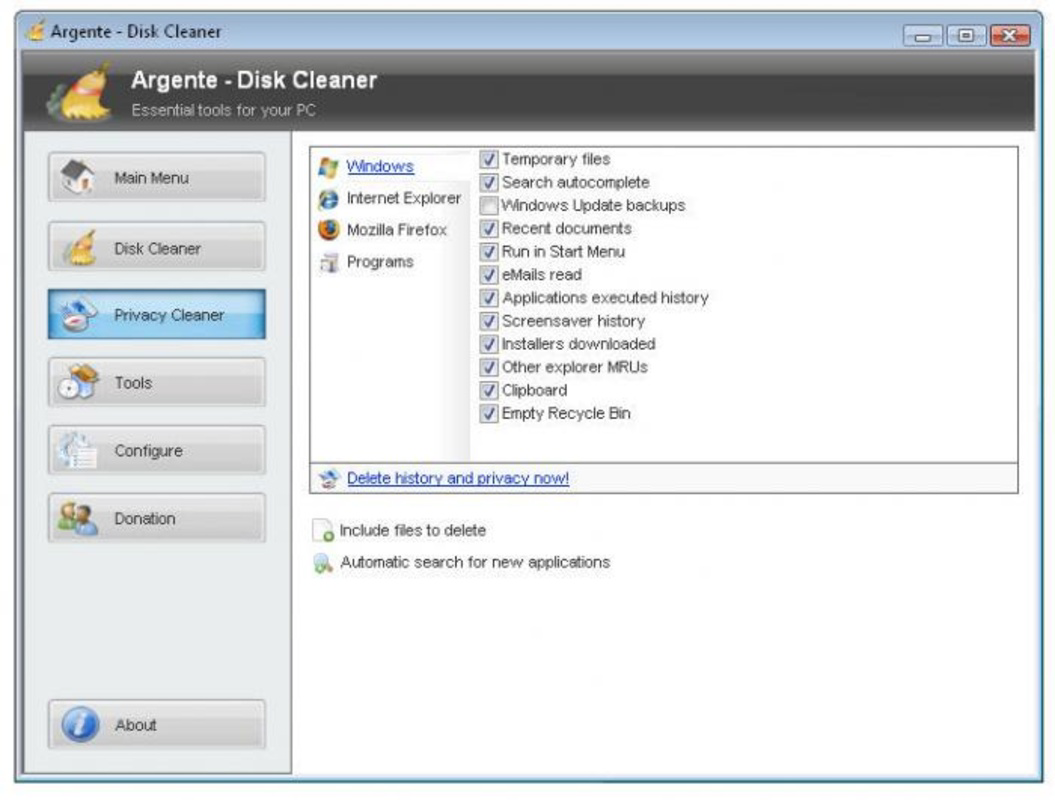
The user interface of Argente Disk Cleaner is designed with clarity and functionality in mind. The layout presents scan results in a structured format, allowing users to review which files will be removed before proceeding. Navigation is straightforward, with main functions accessible through clearly labeled buttons and menus. The visual style leans toward minimalism, focusing on usability rather than decorative elements.
Users can initiate scans, review identified files, and select deletion methods with minimal steps. The application supports both quick and full scan modes, catering to different user needs. Although the developer did not list formal performance metrics, the app appears to operate efficiently on standard desktop configurations, with minimal impact on CPU and memory usage during operation.
Responsiveness is consistent across various system setups, and stability is maintained during long-running scans. The application does not exhibit crashes or freezes during typical use, indicating solid underlying architecture. While no specific details were provided about compatibility with older or low-end systems, the app’s lightweight design suggests broad accessibility. Overall, the user experience is smooth and intuitive, making it suitable for users of varying technical proficiency.
Platform Compatibility & Technical Requirements
Argente Disk Cleaner is available for Windows-based systems, with support for the latest versions of the operating system. The application has a file size of 12.5 MB, making it lightweight and easy to download and install. The software version is 2.0.0, released on July 28, 2025. Specific requirements such as minimum RAM, processor speed, or disk space were not listed by the developer.
The developer did not specify minimum OS requirements, nor did they detail compatibility with older Windows versions. However, the app’s lightweight nature and focus on system cleanup suggest it is likely compatible with most modern Windows environments. Users should ensure their system meets standard Windows installation criteria, though no explicit technical thresholds were provided. For those using non-Windows platforms, the app is not currently available.
Pros and Cons
Pros
- Efficiently identifies and removes unnecessary files to free up disk space.
- Offers seven secure deletion methods for enhanced data privacy.
- Allows users to customize exclusions, preserving important files.
- Automatically checks for new programs to clean up associated data.
- Lightweight design with minimal system impact during operation.
Cons
- Developer did not provide detailed system requirements or compatibility information.
- Only available for Windows; no support for macOS or Linux.
- Specific performance metrics or benchmark data were not disclosed.
- Interface lacks advanced customization options for power users.
- No mobile version available for on-the-go system maintenance.
FAQ
Is Argente Disk Cleaner safe to use?
Yes, the application is designed to remove only non-essential files and includes safeguards such as customizable exclusions and secure deletion. Users can review files before deletion, minimizing the risk of accidental data loss.
Can I use Argente Disk Cleaner on older Windows systems?
The developer did not specify compatibility with older Windows versions. However, the app’s lightweight design suggests it may work on most modern systems. Users should check their OS version and ensure it meets standard Windows installation requirements.
Does the app require an internet connection?
Yes, the application uses online checks to update its database of programs and associated files. This ensures the cleaning process remains effective against new software footprints, though the core cleanup functions can run offline.
How often should I run a system cleanup?
It is recommended to run a cleanup at least once a month, or more frequently if you install or uninstall many programs. Regular maintenance helps maintain optimal performance and prevents disk space from becoming congested.
Is there a free version of Argente Disk Cleaner?
The provided information does not specify pricing details. Users should refer to the official website or app store listing for current pricing and licensing options.
Final Thoughts
Argente Disk Cleaner stands out as a reliable, no-frills tool for maintaining PC health and security. Its combination of efficient cleanup, secure deletion, and automatic updates makes it a practical choice for users seeking to manage their system’s performance without technical hassle. The customizable exclusions and multiple deletion methods offer flexibility and peace of mind, particularly for those handling sensitive data.
While it lacks support for non-Windows platforms and detailed system requirements, its core functionality is robust and well-executed. For Windows users looking for a straightforward, secure way to clean up their systems, Argente Disk Cleaner delivers real value. It is especially beneficial for individuals who prioritize privacy, system efficiency, and long-term device performance.
Download Argente Disk Cleaner now
Guides & Tutorials
How to install Argente Disk Cleaner
- Click the Download button above.
- Once redirected, accept the terms and click Install.
- Wait for the Argente Disk Cleaner download to finish on your device.
How to use Argente Disk Cleaner
This software is primarily used for its core features described above. Open the app after installation to explore its capabilities.
User Reviews
No reviews yet. Be the first to share your experience.
You may also like
more
Que no te pillen¡
About !Que no te pillen¡Reviewed by Jason A. BilbreyShow MoreShow Less

3D Combat Zone
About 3D Combat ZoneOriginally released in 1983, 3D Combat Zone immerses players...

666: El día del portal
About 666: El día del portalOn June 6, 2006, Agent P. Stone uncovers a sinister...

80 in 1 Best Flash games
About 80 in 1 Best Flash games 80 in 1 Best Flash games is a collection of 80 fl...

ABYSS SEEKERーーWhat Do You See Deep in The Abyss
About ABYSS SEEKERーーWhat Do You See Deep in The AbyssIn ABYSS SEEKER, players...

ACA NEOGEO THE KING OF FIGHTERS 2002 for Windows
About ACA NEOGEO THE KING OF FIGHTERS 2002 for WindowsTHE KING OF FIGHTERS 2002,...